
SHAREit
SHAREit is a free Windows app from the SHAREit Team for moving photos, videos and documents between a PC and a phone. The current version is 5.1.0.7.
22.7 MB

Technitium MAC Address Changer is a free Windows tool for viewing and changing the MAC address of network adapters, with details about each connection.
Average 0.0 · ratings: 0
Thank you! Your rating is saved; you can change it. Could not save the rating. Please try again later. Too many ratings from your network today. Please try again tomorrow. The average appears after 5 ratings.
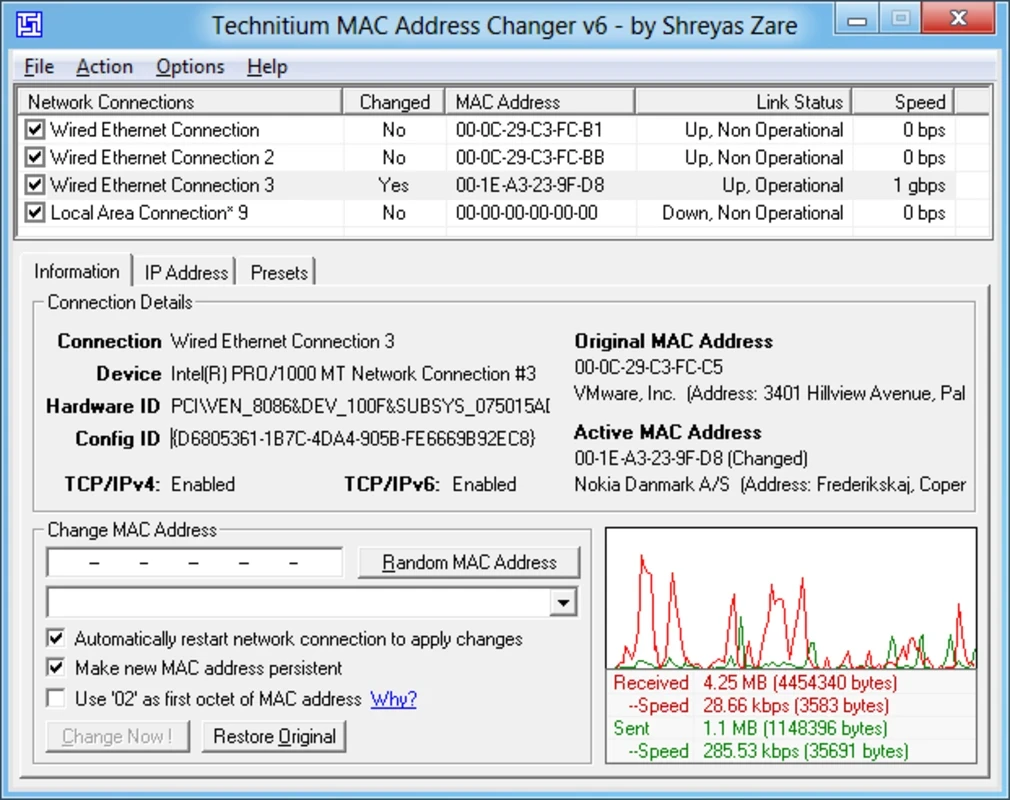
Technitium MAC Address Changer 6.0.7 is a free Windows tool from Technitium that lets you view and change the MAC address of your network adapters. It also shows detailed information about each adapter and connection in one window. You can download Technitium MAC Address Changer for Windows from technitium.com.
| Item | Details |
|---|---|
| Version | 6.0.7 |
| Developer | Technitium |
| Platform | Windows |
| Licence | free |
| Size | about 2.10 MB according to catalogue data |
| Website | technitium.com/tmac |
Every network adapter, whether Wi-Fi or Ethernet, has a hardware address called a MAC address. Networks use it to recognise devices on the local network. Routers assign IP addresses by it, some networks allow only known MAC addresses, and some internet providers bind a subscription to the address of the device that was originally connected. Technitium MAC Address Changer lets you set a different address for an adapter in software, without touching the hardware. Common legitimate uses: replacing a router or network card when the provider only accepts the old address, testing how a network reacts to new devices, troubleshooting address conflicts, or improving privacy on public Wi-Fi so that your laptop is not tracked across visits by the same hardware address. Modern Windows can randomise the Wi-Fi address itself, but it does not give you the same control over wired adapters or specific values. The tool also displays adapter details such as the manufacturer derived from the address, connection status and IP configuration, which makes it handy for diagnostics.
Background on this release is in the developer's blog post about version 6.0.7.
Some Wi-Fi drivers ignore software addresses or accept only certain values. Try a generated address that the tool marks as locally administered, update the adapter driver, or test with a USB adapter. After Windows updates, check that the address is still the one you set.
For network diagnostics, our listings include Advanced IP Scanner, Wireless Network Watcher, WinMTR and Wireshark.
SHAREit is a free Windows app from the SHAREit Team for moving photos, videos and documents between a PC and a phone. The current version is 5.1.0.7.

Zapya for Windows is a free file transfer app from DewMobile for moving files between a PC and phones over a local wireless connection.

Easy Connection to Screen is Samsung's Windows app for showing a PC's screen on a compatible Samsung TV over a wireless connection.

Internet Download Manager (IDM) is a shareware download manager for Windows from Tonec that accelerates, resumes and schedules downloads.

uTorrent (μTorrent) is a small BitTorrent client for Windows from Rainberry (BitTorrent Inc) for downloading and sharing files over torrents.

AnyDesk is a remote desktop application for connecting to and controlling another computer over the internet, from a small Windows program.

ShareMe is Xiaomi's free app for sending files between devices without a cable; on Windows the Android app runs only inside an emulator.

Xender is a free file sharing app from the Xender File Sharing Team for sending files between phones and computers over a local connection.